Starlink Australia
Starlink is giving other satellite internet options in Australia a run for their money. However, you'll need to be prepared to spend at least $75 a month on plan fees.

Starlink is a private satellite internet service launched by Elon Musk's aerospace company, SpaceX.
SpaceX plans to have thousands of low-Earth satellites forming a global cluster capable of delivering internet services to just about any spot on the planet.
It aims to eventually provide high-speed broadband to customers worldwide who can't get a decent internet connection from existing technologies.
Starlink operates through a network of low-Earth orbit satellites that bounce signals from your equipment back to ground stations on earth, completing a broadband connection.
Because Starlink satellites are closer to the earth than other satellite services, the signals should take less time to reach them. This in turn should give households a faster connection.
As of February 2023, SpaceX has launched more than 3,800 Starlink satellites in orbit. It has permission to deploy 12,000 more and hopes to seek further approval for another 30,000 satellites.
Starlink launched in Australia in April 2021, specifically focusing trial efforts in northern Victoria and southern New South Wales.
It has since expanded to 20 Starlink ground stations in the country and the company says most people around the states and territories can access its services.
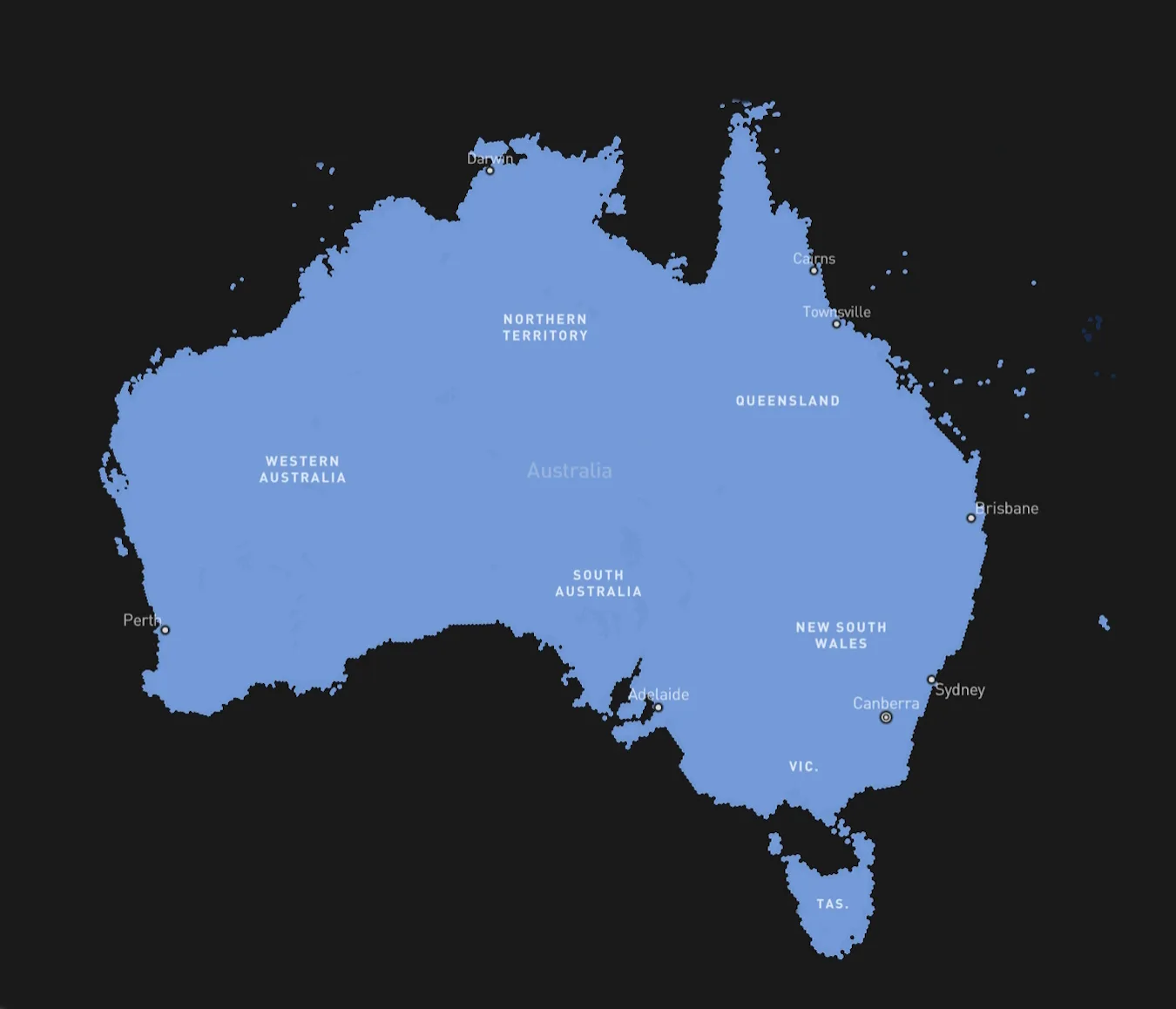
Here's a look at Starlink's coverage map for Australia.
Alternatively, you can head to Starlink's website and enter your address to see if it's accessible at your property.
Residential Starlink plans in Australia cost $139 per month for unlimited data.
However, you’ll need to buy or rent hardware to access the services. Your options include:
Thanks to its partnership with Starlink, Telstra is finally selling satellite internet plans and voice services to rural and remote Australians as of 26 March 2024.
It'll cost $125 a month, while Starlink's residential plans start from $75 a month. However, Telstra will cap download speeds at 50Mbps, whereas Starlink advertises download speeds of up to 200Mbps on Residential Lite and up to 400+Mbps on Residential.
Read our full overview of Telstra's satellite internet plan to see if it's right for you.
Starlink offers a couple of other plans that are better suited to businesses or high-demand users.
This will suit businesses that are based in just one location. The monthly price will depend on the priority data limit you choose.
After that runs out, you’ll have access to unlimited standard data.
You also get a public IP, network priority and priority support.
This plan caters to mobile businesses or is best suited for maritime, emergency response.
Some of the features are similar to Starlink Priority such as network priority and priority support.
A key difference is you get access to a global service in motion with unlimited global data inland, plus ocean use.
You can expect to pay:
Starlink's download speeds range between 20Mbps and 100Mbps on its Standard (Fixed) plan, with a latency of 25ms–60ms and upload speeds of 5Mbps–10Mbps.
Starlink's download speeds range between 20Mbps and 100Mbps on its Standard (Fixed) plan, with a latency of 25ms–50ms and upload speeds of 5Mbps–15Mbps.
Guidelines for Mobile Mobility download and upload speeds are 5-50Mbps and 2-10Mbps respectively.
According to Ookla's Q3 and Q4 report for 2022, Starlink users in Australia experienced median download speeds of 106.43Mbps. This has slightly improved from Q2 median download speeds of 102.76Mbps.
Upload speeds and latency were clocked at 10.45Mbps and 49ms respectively.
If we're looking at starting prices, satellite NBN comes out cheaper than Starlink.
Prices for satellite NBN start at $34.95 per month for a data-capped plan. Starlink costs $139 per month for unlimited data. It’s the only residential plan available.
Prices for satellite NBN can start from $34.95 per month for a data-capped plan. Starlink has multiple unlimited-data residential plans, with prices starting from $75 per month.
On the opposite side, Starlink hardware costs $599 but you also have the option to rent it for $19 a month.
We’ve stacked up Starlink again NBN satellite’s cheapest unlimited data plan for a more apples-to-apples comparison.
| Starlink | NBN satellite | |
|---|---|---|
| Plan price | $139 a month | Starts from $55 a month |
| Set-up costs | Hardware costs $599 or you can rent it for $19 per month | Modem costs up to $200 depending on the provider |
| Data | Unlimited | Unlimited |
| Max speed | 200Mbps | 100Mbps |
Sky Muster NBN caps out at 25Mbps and typically comes with a set monthly data allowance (for data-capped plans), making things a bit more complicated for users. Meanwhile, Starlink offers up to 200Mbps and unlimited data on its NBN plan. That's a massive win for Starlink and why paying more for its services could be enticing.
So while the NBN is the cheaper option of the 2, it's not totally fair to compare them side by side because their inclusions differ so wildly.
This depends on which NBN technology you're looking at. Overall, Starlink compares well to NBN on speed, just not as well on price.
For some NBN customers, especially those on lower quality FTTN connections, Starlink's claim of up to 200Mbps offers much faster speeds than their NBN providers can offer.
In fact, it's faster than the maximum speed of a fixed-line NBN 100 plan.
Keep in mind that faster NBN plans do exist (NBN 250 and NBN 1000) but are currently limited to FTTP and some HFC connection types and are not widely available just yet. If you're lucky enough to have access to them, your average speeds will be faster than Starlink.
However, your latency – the time taken for signals to reach a server – will mostly be higher on Starlink compared to a fixed-line connection since the satellites are further away. High latency can be a problem for video conferencing and especially online gaming.
Starlink always did better than NBN Sky Muster satellite on speeds until NBN launched a new roster of uncapped plans.
Now you can get better than the usual speed limits of 25Mbps.
It follows a similar plan structure to NBN fixed-line plans with its own version of NBN 25, NBN 50 and NBN 100 plans available.
The main caveat is typical evening speeds (what you get during peak hours) aren’t as fast and download speeds can be a bit unstable depending on factors such as network congestion and weather conditions.
Starlink is a superior choice here, offering faster, more reliable speeds than NBN satellite, complete with unlimited data.
Based on numbers, 5G technology is definitely faster than Starlink. In Australia, Starlink has been measured at 230.4Mbps on average across all hours and 199.1Mbps in busy hours, while Telstra's Premium 5G Home Internet lists a typical busy-period download speed range of 62–632Mbps.
Both Starlink and 5G home internet seem like good alternatives to those struggling with slow fixed-line NBN connections. However, it's tricky to compare the 2 technology types as they solve different issues.
For example, Starlink is well-suited to those living in regional or rural areas where options for a good internet connection are limited. 5G home internet offers faster speeds to densely populated areas.
The best option for you will largely depend on your location and how strong 5G coverage is in your area.
While NBN Co is upgrading homes across Australia to fibre connections and raising potential speeds, Starlink is a better bet for speed at the moment, especially if you live outside
metropolitan areas.
However, if you have a stricter budget, an uncapped NBN satellite plan is also a good option.
There's a new kid on the block giving the NBN a run for its money.
See the 10 best and most popular picks among Finder users this month!
Not just an energy company, Origin offers broadband plans to residents across Australia.
Find out how much data you really need each month with our data usage calculator, and you could save on your Internet bill.
Bendigo Telco provides broadband services not only to residents of Bendigo, but to customers right around Australia.
Flip has taken low prices to the NBN world, with seniors discounts available too.
Kogan now offers fixed line NBN plans as well as Home wireless services with competitive pricing. You can learn more about Kogan Broadband offers and plans here.
Looking for a contract-free NBN plan that lets you switch anytime? We’ve curated all available options - just choose the speed and price that work for you.
Check out our top 9 picks across NBN and home wireless broadband.
Enter your full address to see if the NBN is available and compare plans instantly.

Hi I see that I have been charged for 2 mini starlinks so who do I get in contact with with? When it arrives will all the information be with the product on how to set up?
Hi Jane, thanks for reaching out. We’re a comparison website, so we’re not able to help with these specific queries. You will need to contact Starlink directly: https://www.starlink.com/au/support/article/bdb63773-e93b-74e8-8e12-2da2fb6d534e. Hope this helps!
Hi, what starlink product should I choose if I want starlink for my residential home but also be able to take with me in my caravan?
Hi Mandy, the product you’re looking for is a Roam Unlimited plan using the Starlink Standard Kit.
The Starlink Standard Kit is designed for residential users, but it will also provide high-speed, low-latency internet on the go, including in remote locations.
Just be advised that it ain’t cheap – a Roam Unlimited plan will set you back $195 a month, while the kit costs $549.
The light plan for the wait list doesn’t seem to be an option, is there a reason for this?
Hi Brad, it might be that your area isn’t included. You can check the coverage map here and pop in your address to see availability: https://www.starlink.com/au/support/article/6e0a6781-d9e6-8cc1-153e-763daa011f9a Hope this helps!
We’re told that Starlink can provide backup electricity in an outage. (As you know, we at the Gold Coast just suffered a big outage.)
We would love to avoid getting a petrol or diesel generator. Can Starlink do the job for us? Thank you.
Hi Ronald, Starlink itself doesn’t provide backup electricity during an outage. While it can keep your internet connection up and running if you have power, you’d still need a separate power source like a battery backup or generator to keep your equipment running during an outage. Hope this helps!
Hello,
I’m trying to pay my Starlink account but am having trouble. My husband usually does it but he’s away in India at the moment so it’s up to me.
Hope you can help me with this because the account is now due and I don’t want it to be disconnected.
Thanking you,
Hi Errol, Sorry to hear you’re having trouble paying your Starlink bill. Unfortunately, as a comparison website, we can’t assist with billing issues directly. However, you can try logging into your Starlink account, where you should find options to pay your bill or contact their customer support team. Here’s the login link: https://www.starlink.com/auth/login
If you don’t have the login details, you might need to check with your husband to retrieve them.
For your information security, I’ve removed the personal details you shared :)