CommBank international money transfers


- Number of Currencies
- 35
- Minimum Transfer Amount
- $0
- Pay By
- Bank transfer, Cash, PayID, BPAY, Phone banking
- Fees (Pay by Bank Transfer)
- From $0
Our verdict
CBA is a trusted name but it's one of the more expensive options for sending money overseas.
Commonwealth Bank is Australia’s largest retail bank with over $1 trillion in assets and 1,100 branches. As part of its range of financial services, CBA allows customers to make international money transfers. Using the bank’s services, you can transfer money to over 200 countries in more than 30 currencies. Banks are typically more expensive and slower than money transfer specialists but some people prefer sticking with a trusted name.
It's fine to use CBA if you're making small one-off transfer overseas. Once your transaction goes over $500, we recommend using a money transfer provider as CBA's poor exchange rates will eat into your money. With the cost of living crisis, it's worth comparing your options to find a better exchange rate.
Pros
-
No transfer fees via NetBank or the CommBank app.
-
Easily trace, amend, or cancel transfers with the Payment Tracker.
Cons
-
Daily transfer limits may apply.
-
Transfers may take up to 3 days or longer, depending on the recipient’s location and bank.
Details
Product details
| Product Name | Commonwealth Bank |
| Pay By | Bank transfer, Cash, PayID, BPAY, Phone banking |
| Receiving Options | Bank account |
| Customer Service | Phone, Live chat, 24/7 support |
| Maximum Transfer Amount | $5,000 (daily limit) |
| Number of Currencies | 35 |
CBA exchange rates
CBA says its advertised retail exchange rates include a margin, so the rate you get will be less favourable than the mid-market rate you see on a currency converter. It's worth comparing it with what a dedicated money transfer provider offers before you send. CBA allows you to transfer money from common currencies like the Euro through to more exotic offerings like the Czech Koruna.

"I had to use the CBA international money transfer service to send money domestically. Basically, there was no facility other than this to send a 20% house deposit to an REA Trust account. You'll pay a premium in % fee of the total amount, so make sure you have that available too, but the funds are received in 48 hours. "
CBA transfer fees
CBA waives its transfer fee when you send money overseas in NetBank or the CommBank app, unless it's an AUD to AUD transfer. For cross-currency transfers (for example, sending US dollars from an AUD account), CBA also pays any correspondent bank fees, although it won't cover fees charged by the recipient's bank. Transfer times depend on the destination country, the correspondent and recipient banks and local regulations, and transfers made on a weekend or public holiday are processed the next business day.
If you send money overseas from a branch instead, a transfer fee applies and CBA sets a minimum transfer amount. CBA still pays correspondent bank fees on cross-currency transfers made in a branch.
| Description | Fees |
|---|---|
| Transfer made via NetBank or the CommBank app (FX conversion) | $0 |
| Transfer made via NetBank or the CommBank app (no FX conversion) | Transfer fee applies |
| Cancel international money transfer | $25 plus overseas bank's costs |
| Trace international money transfer | $25.00 per investigation |
| Transfer made via bank branch | $30 |
| Cost to receive money transfer | up to $11 |
Minimum transfer amount and available countries
CBA doesn't list a minimum amount for transfers made in NetBank or the CommBank app, but transfers made in a branch have a minimum. While the standard amount you can send overseas at any one time through NetBank is $5,000, you can apply to have this limit raised to up to $50,000.
While there’s no list available that outlines the countries you are unable to transfer to through CBA, transfers to countries such as Afghanistan, Russia, Cuba, Iran, Iraq, Syria and Somalia are not available.
CBA allows transfers in the following currencies:
| CAD | CZK | DKK | EUR |
| FJD | GBP | HKD | HUF |
| INR | IDR | ILS | JPY |
| KWD | MUR | XPF | NZD |
| NOK | OMR | PGK | PHP |
| PLN | SAR | SGD | SBD |
| ZAR | KRW | LKR | SEK |
| CHF | THB | TRY | AED |
| USD | VUV | VND |
What are the pros and cons?
Pros
- Secure. Using a trusted provider means your transfer is conducted through the secure SWIFT international banking system.
- Range of options. You can send a transfer in NetBank, in the CommBank app or in a branch.
Cons
- Exchange rates. You'll get better exchange rates with dedicated international money transfer companies.
- Range of currencies. CBA supports over 30 currencies, while the likes of Wise have 80+ currencies.
- Low daily transfer limit. Initially you're limited to a daily limit of $5,000, while providers such as OFX and TorFX have no transfer limits. You can increase your limit in NetBank or the CommBank app.
What types of transfers can you carry out with CBA?
- Internet banking. You can lodge an international money transfer through your NetBank account.
- In-branch banking. You can lodge a transfer by visiting a branch, but you’ll be charged more for the transaction than if done online.
- Forward contracts. CBA allows you to lock in an exchange rate now for a transfer you want to make in the future.
- One-off transfers. You can lodge a one-off transfer with CBA.
- Regular transfers. You can also set up regular scheduled transfers to automatically send funds overseas.
If you ever need assistance when conducting a CBA international money transfer, there are plenty of customer service options available. As well as seeking help in branch, you can search the bank’s online help resources, ask a question on the CBA community, or even phone for assistance.
The registration and transfer process
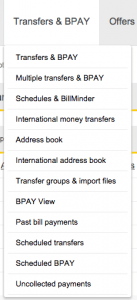 You’ll need to be a CBA customer in order to use its money transfer services. You can open an account at a CBA branch by supplying appropriate identification and contact details. If you wish to sign up for NetBank, you can do this online by supplying details of your Commonwealth Bank debit card, credit card or keycard, plus your mobile phone number.
The first time you lodge an international money transfer via NetBank, you’ll have to click on "Increase Your Limit Now" to set your international money transfer limit.
Once that’s done, select "Transfers and BPAY" and click on "International Money Transfer". Enter the country you’re transferring money to and the recipient’s bank code.
Next, type in the recipient’s bank details and select the account you would like to transfer the funds from.
Finally, enter the amount and currency, and then click "Next" to confirm your transfer.
What other products and services does CommBank offer?
- Foreign currency accounts. You can choose from 15 major global currencies and send and receive payments to and from overseas without having to repeatedly convert currencies.
- Travel money cards. A travel money card from CBA allows you to load up to 13 currencies onto your card, which is accepted at more than 35 million locations worldwide. No transaction fees apply to purchases.
Find cheaper alternatives to CommBank
Finder Score for money transfer
We review money transfer providers for different features to assign them a score out of 10. The higher the score, the more competitive the product.
FAQs about CommBank overseas transfers
Compare other products from Commonwealth Bank
- Commonwealth Bank credit cards
- Commonwealth Bank home loans
- Commonwealth Bank savings accounts
- Commonwealth Bank term deposits
- Commonwealth Bank superannuation
- Commonwealth Bank personal loans
- Commonwealth Bank car loans
- Commonwealth Bank business loans
- Commonwealth Bank travel insurance
- Commonwealth Bank car insurance
- Commonwealth Bank life insurance
- Commonwealth Bank income protection
- Commonwealth Bank landlord insurance
Frequently asked questions
Your reviews

Shirley Finder
Publisher
You are about to post a question on finder.com.au:
- Do not enter personal information (eg. surname, phone number, bank details) as your question will be made public
- finder.com.au is a financial comparison and information service, not a bank or product provider
- We cannot provide you with personal advice or recommendations
- Your answer might already be waiting – check previous questions below to see if yours has already been asked
Finder only provides general advice and factual information, so consider your own circumstances, or seek advice before you decide to act on our content. By submitting a question, you're accepting our Terms Of Service and Finder Group Privacy & Cookies Policy.
This site is protected by reCAPTCHA and the Privacy Policy and Terms of Service apply.