In this guide
- Review
- Frequently asked questions
- Your reviews
- Ask a question
Exodus wallet review

- Supported assets
- 1,000,000
- Price (USD)
- Free download
- Wallet type
- Mobile wallet,Desktop wallet,Web browser wallet,Web3 wallet
Summary
A Bitcoin wallet that offers versatile design and multi-currency features.
Exodus is a desktop wallet designed to give you complete control over your cryptocurrency assets.
For starters, it’s the first desktop wallet that offers full compatibility with ShapeShift – a popular instant cryptocurrency exchange supporting dozens of tokens. This means Exodus users have access to nearly a dozen cryptocurrencies.
Like other desktop wallets, Exodus stores cryptocurrency assets directly on your machine. Because Exodus is a lite wallet, you never have to download the whole blockchain to your computer.
Exodus's biggest claim to fame is its intuitive, user-friendly platform. The Exodus desktop wallet aims to give you all the bells and whistles to control an entire cryptocurrency portfolio, but it is designed for people who have never actually used an exchange.
Pros
-
Good interface with powerful charting tools
-
Ideal for the cryptocurrency trader or portfolio builder
-
Access to nearly a dozen cryptocurrency assets
-
Tutorials and videos to guide you through setup and use
-
Engineered for beginners
Cons
-
Lack of two-factor authentication, which has raised some security concerns
In this guide
- Review
- Frequently asked questions
- Your reviews
- Ask a question
Compatibility
- Desktop app for Windows, macOS and Linux, mobile app for iOS and Android, and the Exodus Web3 Wallet browser extension.
- Works with Ledger and Trezor hardware wallets.
How much does it cost?
Exodus itself doesn't charge a fee to send or receive crypto. You pay network fees instead, which go to each blockchain network (bitcoin, Ethereum, Litecoin, etc.) and are not kept by Exodus.
You can adjust the fee settings in the wallet to make a transaction faster or cheaper.
Swapping one asset for another in the app is different: swaps are provided through third-party providers and carry a cost, so check the quote in the app before you confirm a swap.
Which cryptocurrencies can I store?
Exodus supports a wide range of crypto assets, including Bitcoin (BTC), Ethereum (ETH), Tether (USDT) and Solana (SOL), and adds new assets regularly. Check the supported assets list on the Exodus website for the full, current list.
How do I add currency to my wallet?
The easiest way to add cryptocurrency assets to your Exodus wallet is to first purchase them with your national currency (eg, Australian dollars). You can then transfer them to your Exodus wallet for safe storage.
Exodus also lets you buy and sell crypto directly in the wallet through third-party providers, where available. If you'd rather use an exchange, you can compare Australian crypto exchanges below.
Looking for other options? Check out these similar products.
How we picked theseHow do I make or receive payments with Exodus?
Transactions over a cryptocurrency network can be made directly through your Exodus wallet. The network charges a transaction fee, which is paid to the network itself and not Exodus.
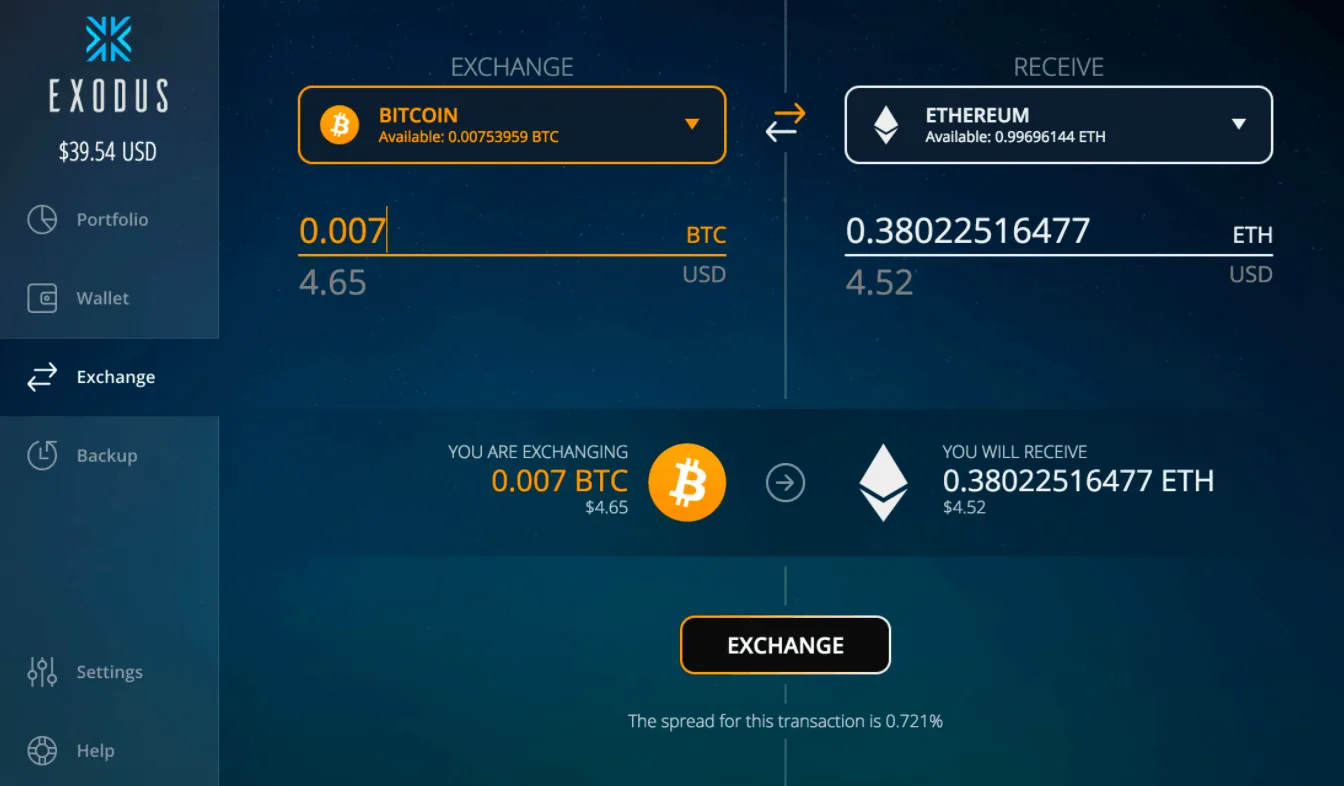
To send cryptocurrency funds, click the “Wallet” button on the left sidebar and select the asset you want to send. Enter the address of the recipient and click “Send.”
To receive cryptocurrency assets with Exodus, click the “Wallet” button and select the asset you want to receive. For example, if you want to receive bitcoin, your bitcoin address will automatically appear. You can copy this address and give it to another person to receive bitcoin payment from them.
How secure is Exodus?
Exodus is a self-custody wallet. It encrypts your private keys and stores them on your own device, so you keep full control of your assets.
To back up your wallet, you use a secret recovery phrase, which lets you restore the wallet on any compatible device if your computer or phone is lost or breaks down. You're responsible for storing this phrase safely: if you lose it, you might not be able to recover your wallet.
For extra protection, you can secure the wallet with a device-based passkey, and connect a Ledger or Trezor hardware wallet to manage and swap crypto in Exodus.
If you run into problems, Exodus offers 24/7 customer support.
Because Exodus is self-custodial, you're fully responsible for keeping your recovery phrase and your devices secure. Keep this in mind when you set up your wallet.
Where can I get Exodus?
You can download the Exodus desktop app from the company’s website, get the mobile app from the App Store or Google Play, or add the Exodus Web3 Wallet extension from the Chrome Web Store.
Next steps
Getting started with Exodus is a few clicks away. By navigating to the main website, you can download the wallet directly to your desktop and begin setting up your account. If you already possess cryptocurrency, you can start transferring them into your Exodus wallet right away.
If you ever run into issues, Exodus has a knowledge base and tutorial videos on YouTube to help you get started, plus 24/7 customer support.
Compare Exodus to other crypto wallets
Frequently asked questions
-
Yes. Exodus is available as a mobile app for iOS and Android, as well as a desktop app and a browser extension (Exodus Web3 Wallet). According to Exodus, your wallet can sync across your devices.
-
Exodus does a good job keeping its users informed about latest developments. You can find the latest versions of the wallet available for download from their website.
-
Exodus is available on desktop for Windows, macOS and Linux, and on mobile for iOS and Android. Check the download page on the Exodus website for the minimum operating system versions before you install it.
Sources
-
Finder writers are subject matter experts and use primary sources, in-depth research and interviews with other experts to ensure you're getting accurate, up-to-date information. Articles are fact checked in line with our editorial guidelines.
Your reviews

Sam Finder
Contributor
Hi there, looking for more information? Ask us a question.
You are about to post a question on finder.com.au:
- Do not enter personal information (eg. surname, phone number, bank details) as your question will be made public
- finder.com.au is a financial comparison and information service, not a bank or product provider
- We cannot provide you with personal advice or recommendations
- Your answer might already be waiting – check previous questions below to see if yours has already been asked
Finder only provides general advice and factual information, so consider your own circumstances, or seek advice before you decide to act on our content. By submitting a question, you're accepting our Terms Of Service and Finder Group Privacy & Cookies Policy.
This site is protected by reCAPTCHA and the Privacy Policy and Terms of Service apply.

Rench Finder
February 01, 2018
Hi,
Thanks for your inquiry.
Yes, that is possible. Since Exodus can be accessed directly on the company’s main website, you can log into your account from a different computer and then download the wallet directly to the computer you are using.
Cheers,
Rench
Sam Bourgi is a contributing writer to Finder, where he specialises in financial markets. He has spent the past nine years focused on economics, markets and cryptocurrencies. His work has been featured in and cited by some of the world's leading newscasts, including Barron's, Yahoo, CBOE and Forbes. See full profile
phillogan56
January 26, 2018
Can I have a copy of my wallet on more than one computer and access the exchanges?