OFX review


- Number of Currencies
- 50+
- Minimum Transfer Amount
- $250
- Pay By
- Bank transfer, BPAY
- Fees (Pay by Bank Transfer)
- $0
Our verdict
Reliable money transfer provider with competitive exchange rates, no set maximum transfer limit, and coverage across 50+ currencies worldwide.
OFX supports transfers in over 50+ currencies to more than 170 countries, making it suitable for customers sending large amounts overseas. It offers broad global coverage, similar to other leading international money transfer providers.
Similar to other currency brokers, OFX provides the standard forex tools such as forward contracts and limit orders to hedge your risk. It has no maximum transfer limits, and its percentage-based fee structure may offer better value for larger transfers. OFX is ideal for people relocating overseas, buying property or inheriting money.
While you can create a free account online, you'll need to speak with OFX on the phone to verify your details before making your first transfer. You'll want to look elsewhere if your recipient doesn't have a bank account or you only plan on making small transfers.
Pros
-
Good for large transfers, and it has products specifically designed for personal or business use.
Cons
-
Not so great if you need to pay with card or cash, or if your recipient doesn't have a bank account.
Details
Product details
| Product Name | OFX |
| Pay By | Bank transfer, BPAY |
| Receiving Options | Bank account |
| Customer Service | Phone, Email, 24/7 support |
| Maximum Transfer Amount | Unlimited |
| Number of Currencies | 50+ |
What we like
- Wide range of currencies. OFX supports over 50+ currencies, including less commonly traded ones.
- No fees. There are no transfer fees for transfers over $10,000.
- Fix your rate. You can lock in an exchange rate for up to 12 months with a forward contract.
- Flexible options. Pick from one-off transfers, limit orders, forward contracts and recurring transfers.
- Large bank network. With more than 115 bank accounts in the OFX network, chances are good you'll be able to transfer locally to avoid unwanted bank fees.
- ATO approved. OFX is one of two providers approved to pay ATO from overseas.
What we don't like
- First transfer requires phone verification. You can sign up for a free account online, but you'll need to be ready to accept a call from an OFX representative to verify your information before you can begin sending money worldwide.
- Recipient must have a bank account. If you want to send to a mobile wallet or cash pickup location, a different service will suit you better.
- Minimum transfer. The minimum transfer amount is $250 per transfer for Australian users.
- Limited payment options. OFX doesn't accept cash, cheque, or credit card payments.
How are OFX's fees and exchange rates?
OFX charges a flat $15 fee for Australians on transfers under $10,000 and waives its fee above that amount. Based on data gathered by FXC Intelligence Ltd, avoiding the banks will save you up to US$462 when exchanging AU$20,000 to USD with OFX.
It is important to remember that while OFX doesn't charge a transfer fee, it charges a margin is included in the exchange rate. For transfers under AUD $10,000 made outside the OFX Australia Business Platform, a small fixed fee applies.
OFX reviews and complaints
As at September 2026, OFX has a Trustpilot rating of 4.2 out of 5 based on around 11,400 customer reviews. Many customers highlight OFX's helpful customer service and competitive rates on large transfers, while some report delays during transfers or the identity verification process. OFX follows AML regulations that require customers to verify their identity by providing documents and confirming details over the phone.
As at September 2026, 81% of customers gave OFX 5 stars, while 12% rated them 3 stars or lower on Trustpilot. OFX appears to respond to many negative reviews, often providing contact details for customer support to help resolve issues. On ProductReview.com.au, OFX holds a rating of 2.8 out of 5 based on over 349 customer reviews. Some reviewers there mention frustration with OFX's compliance and verification requirements.
Is OFX safe to use?
OFX is regulated in Australia, Singapore, Hong Kong, New Zealand, UK, European Union, USA, and Canada. In Australia, OFX (OzForex Limited, ABN 65 092 375 703) holds an Australian financial services licence from ASIC (AFSL no. 226 484) and is a reporting entity under the anti-money laundering and counter-terrorism financing laws AUSTRAC administers. It is also a member of the Australian Financial Complaints Authority (AFCA). Neither a licence nor AUSTRAC oversight is a government guarantee of your money. It is one of two providers that are approved to pay the Australian Tax Office (ATO) from overseas.
OFX has served over 1 million clients and operates a global network of 115 bank accounts. Since its launch in 1998, OFX has transferred more than AU$100 billion across 50+ currencies worldwide. Also, banks such as Macquarie International trust OFX's platform to power international money transfers for their clients.
What would your OFX transfer look like?
Use the table below to find out more details about what making a money transfer with OFX looks like. Click the Go to site button to visit OFX's site and get a quote for your transfer.
Complete the form and a representative from OFX will call you back. If you complete the form on a weekend you'll get a call during a business day.
Finder Score for money transfer
We review money transfer providers for different features to assign them a score out of 10. The higher the score, the more competitive the product.

"I use an international money transfer service to move money from my Canadian bank account to my Australian account when the exchange rate is favourable. I've found it to cost less than bank transfers and the fees and exchange rates are fair."
What are the ways I can send money abroad with OFX?
You can transfer money internationally with OFX through several options:
- Spot transfers. Exchange currencies at the current market rate and send your funds right away.
- Regular Payments. Schedule automated or recurring transfers for ongoing payments.
- Multipay. Send multiple payments in one go, ideal for payroll or supplier payments.
- Forward contract. Lock in an exchange rate now for a future transfer, helping you manage currency risk.
- Limit order. Set a target exchange rate, and your transfer will automatically be made once that rate is reached.
How to make your first money transfer with OFX?
Firstly, you will need to set up an account with OFX. Follow the eight steps below to get started:
- Register for an OFX account, or log in using the buttons at the top right of the website.
- You'll need to verify your identity by providing ID, such as your passport, driver's license, and proof of address.
- Once logged in, confirm your currencies and transfer amount. Check the OFX customer rate, and proceed to "Add your recipient".
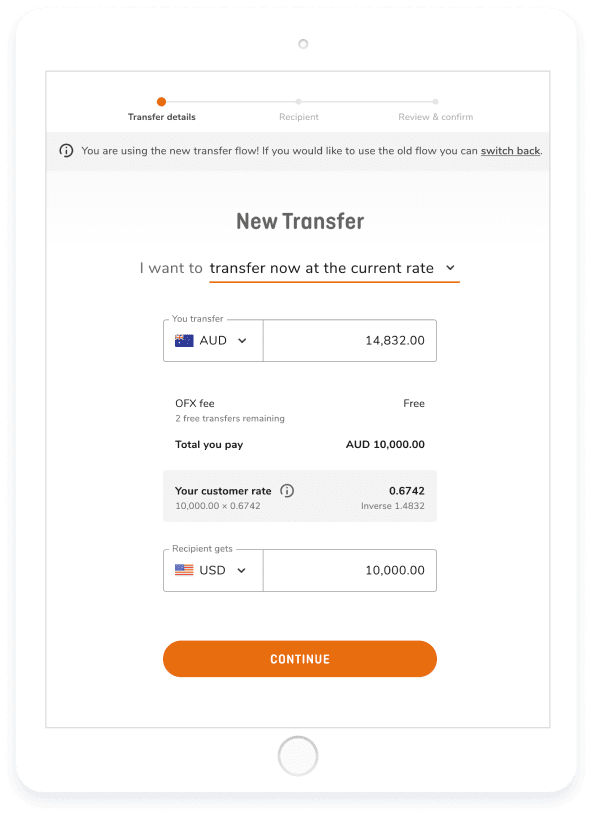
- Enter your recipient's bank details, such as their country, currency, account name, and bank address. Once reviewed, the recipient will be saved for future use, and you can contact OFXperts for assistance if needed.
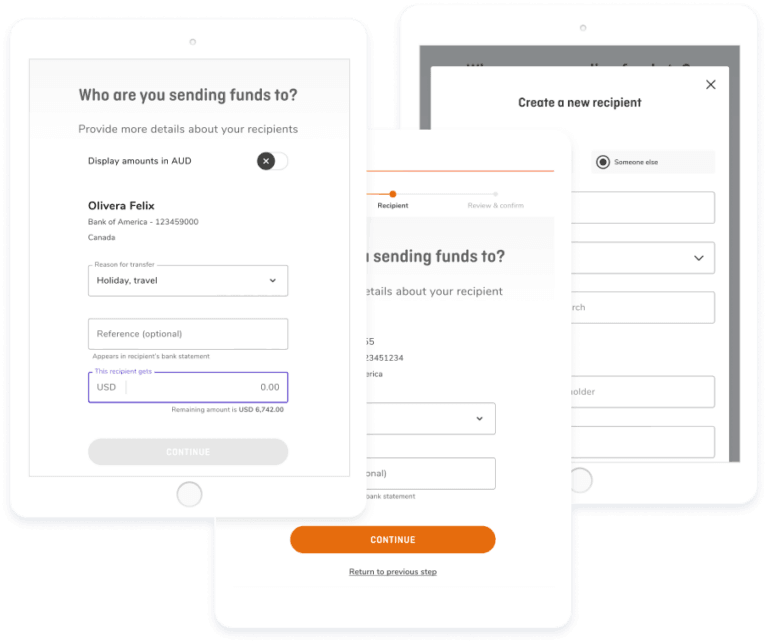
- Link your bank account to the OFX platform by entering the details of the account you'll transfer from. You can also fund your transfer by sending a payment directly to OFX.
- Choose how you'd like to send your funds: transfer immediately at the current exchange rate (Spot Transfer), set a target rate (Limit Order), or lock in a rate for a future date (Forward Contract).
- Add a reference for your transfer, such as "goods purchase" or "vendor payment," which will appear on your recipient's bank statement. Then select 'Review & Confirm', check your details, and hit 'Confirm'.
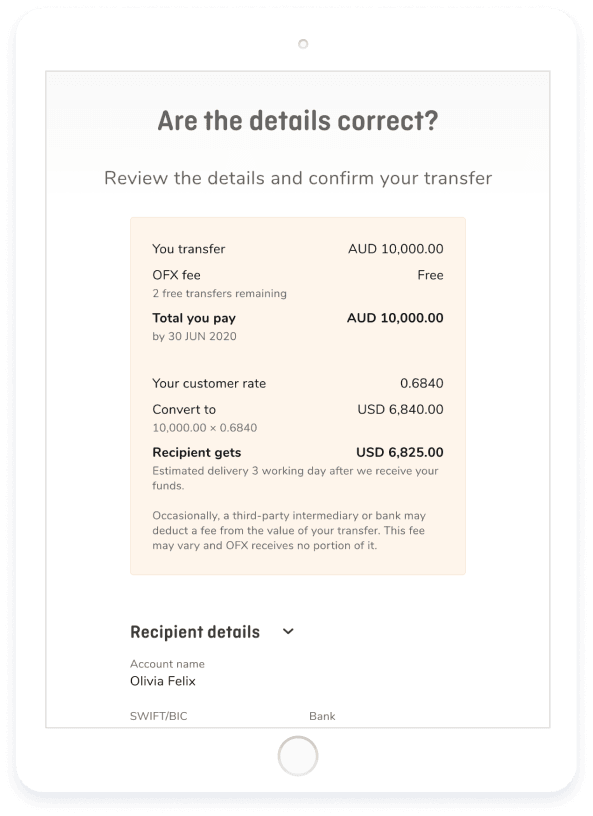
- An OFXpert will call you after you book a personal transfer if it's your first transfer, involves a new recipient, an exotic currency, or exceeds $100,000.
What are OFX's payment options?
OFX has multiple payment options including BPAY, Electronic Funds Transfer and Direct Debit. You will receive an email after you have locked in your transfer. This will include the payment options available for your transfer.
However, it is worth noting that OFX doesn't accept transfers made via cash, cheque or debit card.
How long does an international transfer with OFX take?
OFX separates its transfers into two categories: major currencies and exotic currencies. In general, these two categories have the following transfer speeds:
- Major currencies: 1-2 business days
- Exotic currencies: 1-3 business days
Both transfers may have additional time added on depending on how long it takes for your bank to transfer the money to OFX.

My experience with signing up
I wasn't looking forward to signing up for an OFX account because I don't like speaking with customer service on the phone, but it turned out to be a relatively painless process. After creating my account and submitting my documents online, I called OFX and was connected with a representative within a few minutes. After answering questions about my ID and address, my account was good to go. Here are some key takeaways:
- Did I have to interact with customer service? Yes, there is no way around this step.
- How long did it take? The entire process took less than an hour, but only about five minutes of that time was actively spent signing up - the rest was just waiting.
- What was unexpected? Customer service got straight to the point when I talked to them, so I was on and off the phone in less than five minutes.
Yes, OFX has an app on both Google Play and the App Store. The OFX app makes it possible to do the following:
- Monitor exchange rates. View current and historical exchange-rate data with a few taps.
- Log in using biometrics. Both face and fingerprint recognition can be used to log in.
- Track your transfer. See exactly where your transfer is anytime during its transition.
- Access to dozens of currencies. Transfer between more than 50+ currencies in more than 170 countries worldwide.
| Ratings accurate as of 17 October 2025 | |
|---|---|
| Google Play Store | 4.1 out of 5, based on 4.18K reviews |
| Apple App Store | 4.8 out of 5, based on 2.6K ratings |
How does OFX compare to other money transfer services?
Finder Score for money transfer
We review money transfer providers for different features to assign them a score out of 10. The higher the score, the more competitive the product.
Compare OFX vs. Wise and TorFX
Wise may be more suitable for smaller transfers, while OFX is typically used for larger amounts, such as transfers of $10,000 and above. Wise has a minimum transfer amount of $1, while OFX's minimum transfer is $250. Both providers offer international money transfer services but cater to different customer needs.
Based on our research, TorFX and OFX both offer competitive services for large money transfers. TorFX does not charge transfer fees and provides similar exchange rates with slightly faster delivery times in some cases. OFX, on the other hand, supports over 50+ currencies compared to around 40 currencies with TorFX. Both providers offer dedicated account managers, FX foreign exchange tools and are well-established in Australia.
Frequently asked questions
Sources
Your reviews

Rosie Finder
Writer
You are about to post a question on finder.com.au:
- Do not enter personal information (eg. surname, phone number, bank details) as your question will be made public
- finder.com.au is a financial comparison and information service, not a bank or product provider
- We cannot provide you with personal advice or recommendations
- Your answer might already be waiting – check previous questions below to see if yours has already been asked
Finder only provides general advice and factual information, so consider your own circumstances, or seek advice before you decide to act on our content. By submitting a question, you're accepting our Terms Of Service and Finder Group Privacy & Cookies Policy.
This site is protected by reCAPTCHA and the Privacy Policy and Terms of Service apply.

Nikki Angco
November 15, 2018
Hi John,
Thanks for reaching out. You may certainly transfer funds from Thailand to Australia using OFX. Head over to their website regarding international money transfer. It will show different ways how to do a transfer whether its a Rapid Transfer (to lock in exchange rates) or Risk Management.
Hope this was helpful. Don’t hesitate to message us back if you have more questions.
Best,
Nikki
Show more Show less
Rosnani
January 18, 2017
Hi my friend from Australia did use your service transfer the money via my bank in Malaysia almost 7 days. Who I suppose to check the transfer clearing in my accounts. Because I check from My Maybank is no fund cleared. My friend said the fund is in my accounts. Please advise me what I suppose to do and with who to check for the clearance money.
TQ
Rose
Show more Show less
Anndy Lou
January 18, 2017
Hi Rosnani,
Thanks for your question.
With OFX, transfers can reach the destination account up to two days depending on where the money is sent.
If the money is not yet available in your account after 7 days, it is best to contact OFX directly. They offer a 24-hour service so you can call them anytime on +61 2 8667 8090 (if you are calling from outside Australia).
Cheers,
Anndy
Show more Show less
Mo
October 12, 2016
Regarding the special offer “There is also a $0 online transfer fee for all finder.com.au customers.”, is this a one off or ongoing special? How does OFX know to apply this offer to Finder customers? Thanks.

Clarizza Fernandez Finder
October 13, 2016
Hi Mo,
Thanks for your question.
Only users who use the finder.com.au link are able to take advantage of the $0 fee offer.
If the $0 offer hasn’t been applied, please let us know and we’ll pass on your details to OFX.
Cheers,
Clarizza
Kate
July 28, 2016
Hi OFX,
I would like to send about USD 10,000 to my Etrade account in the USA. It has to go from my NAB account (an AUD account) to Wells Fargo Bank, Routed to Etrade Clearing LLC to be deposited into my Etrade Brokerage Account. Is this something you can do? Or do all transfers have to be from Bank Account to Bank Account? I look forward to answer. Thanks, Kate
Show more Show less
May Finder
July 28, 2016
Hi Kate,
Thank you for your inquiry.
Please note that you have come through to finder.com.au we are an Australian financial comparison website and general information service, not actually OFX.
If you want to send money using OFX, please register on OFX by clicking the ‘Go to Site’ button above. You can also find more about the transfer process by reading the topic “The registration and transfer process” outlined above.
In the meantime, aside from OFX, you also have the option to send money via wire transfer – that is from your NAB account to Wells Fargo Bank via online banking of NAB. You can complete the process when you visit and check NAB international funds transfer page.
Hope this has helped.
Cheers,
May
Show more Show less
Bill
May 10, 2016
Hi, We are an Australian business that would like to make payments to our suppliers and contractors in New Zealand. Can you confirm if the money sent via OFX goes direct to our suppliers bank account or is there a Correspondent in the middle that charges an additional fee for handling the transaction between ourselves and our supplier? We are happy to pay a transfer fee from our end but need to make sure the money we are sending to our supplier is paid in full into their account less any fees their own bank might charge to handle transfer of fx. Let me know when you can. Thanks.
Show more Show less

Shirley Liu Finder
May 11, 2016
Hi Bill,
Thanks for your question.
The funds sent via OFX goes directly to the bank account you’ve specified, so there are no additional fees for handling the transaction.
Hope this helps.
John
November 15, 2018
Can I transfer from Thailand to Australia.