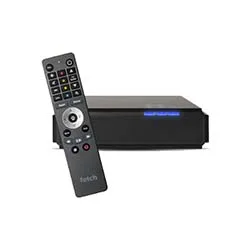
Buy the Fetch Mini
The Good Guys

By
Matt SayerUpdated

Fetch is majority-owned by Telstra, which acquired a majority stake in Fetch TV in 2022.
Fetch (also known as Fetch TV) sells itself as Foxtel for the Internet age, combining the most-popular pay TV channels with a growing library of on-demand movies and TV shows. Using your broadband Internet connection, the subscription service streams its content directly to your TV through the Fetch set-top box, saving you the hassle of a separate cable installation for both pay TV and home Internet.
This set-top box is Fetch's big draw. Once hooked up to your TV and home network, it serves as your gateway to the dozens of channels and thousands of movies the service has to offer. It's a TV guide, video recorder and movie store all in one, making it a versatile addition to any entertainment centre.
As a one-stop shop for all your streaming needs, Fetch has plenty to offer discerning TV and movie buffs. Here are some of the key features the service packs in.
Buying or renting movies. Fetch's Movie Store has thousands of movies to rent or buy, from the latest releases to much-loved classics, in SD or HD, with a selection in 4K. When you rent a movie, you have 7 days to start watching it and 48 hours from when you first press play to watch it as often as you like. Buying a movie gives you the right to watch it as often as you like on your current Fetch service.
Premium TV. Fetch's Premium Channel packs bundle channels from providers including ESPN, Nickelodeon, Discovery, MTV, BBC and Universal. Each pack has a theme: Vibe covers international sports, dramas and music, and Knowledge covers news, documentaries and everyday life. There are also Variety and Kids packs, or you can get the Ultimate Pack.
Alternatively, if you prefer to watch your favourite TV shows on-demand, Fetch also sells shows individually, offering selected shows for purchase both as full seasons and as single episodes. You cannot rent TV shows.
Other subscription add-ons. Fetch also offers special interest packs, including beIN Sports, ESPN, Horse & Country, TBN Good and an Italian pack. You can also use streaming apps on your Fetch box, such as Prime Video, Paramount+ and Optus Sport, with a separate subscription to each service.
Record live TV. Only available on the Mighty version of its set-top box, Fetch makes recording your favourite TV shows a breeze. With a built-in 1TB hard drive capable of storing up to 585 hours of TV and a handy Series Tag function for designating shows you want Fetch to automatically record for you, the Mighty Box ensures you won't have to miss another episode of House Hunters ever again.
Catch-up TV. Along with built-in apps for catching up on last week's free-to-air TV, Fetch lets you re-watch recent episodes of select shows from any premium channel packs you've subscribed to.
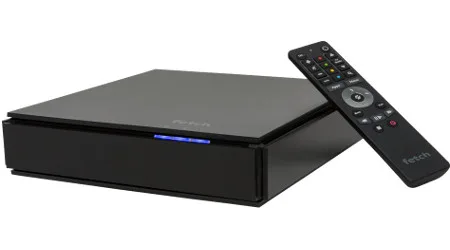
To access Fetch content, you'll need a Fetch set-top box. Whether it's bundled in with your Internet plan, or you purchase it separately from a participating retailer, Fetch simply won't work without it. The box comes in two models: the Mini, small and lightweight for those who are only interested in streaming through Fetch; and the Mighty, larger and more feature-packed for those who want to take advantage of everything Fetch has to offer.
The smaller of the two units, the Mini supports all the free-to-air catch-up apps, streaming apps like Netflix, and any Premium Channels you subscribe to. You can rent and buy movies as well as buy TV shows on the Mini, pause live TV for up to 15 minutes, and connect your mobile devices for watching Fetch content on-the-go.
In addition to doing everything the Mini can, the Mighty box packs a 1TB hard drive for recording live TV, supports resolutions up to 4K, and comes with 4 built-in TV tuners, so you can record up to 6 channels at the same time.
Fetch currently sells two boxes: the Mini (G5) and the Mighty. Both support 4K, but only the Mighty has a built-in hard drive for recording live TV. You can compare the full technical specs on Fetch's website.
In addition to the set-top box, you can use the free Fetch Mobi App for Android and iOS to watch the channels you subscribe to, set recordings from anywhere and download movies and shows you've bought to watch offline. You can't watch free-to-air channels in the app, and you need to be on the same network as your Fetch box to watch your recordings.
While you can't currently watch Fetch on your computer, you can play video files, photos and music from your computer on your TV over your home network, or from a USB drive, using the My Media Hub app. My Media Hub works on the Mighty and older Mini models, but not on the latest Mini (G5).
Fetch also recommends a minimum broadband connection of 3Mbps for stable viewing across all devices.
Fetch sells a Bluetooth voice remote (sold separately) that lets you control Fetch with spoken commands like "Fetch Netflix" or "Go to 7plus" and search for movies and shows by voice. It works with both the Mini and the Mighty.
You can buy the voice remote from Fetch's official online store.
Any movies you rent or purchase and any TV shows you buy can be downloaded to your mobile device through the Fetch app, letting you watch your content even if you don't have access to an Internet connection.
For large households, a single Fetch box might not be enough. With Multiroom, up to three Fetch boxes can be set up in different rooms of your house, making it possible for multiple people to watch different Fetch content all at the same time. By connecting the separate boxes to the same Fetch account, you can access all your rentals, purchases and subscriptions from any individual unit, saving you from those frustrating arguments over whose turn it is to pick the night's viewing. Similarly, any live TV you record on one box can be shared with the others, too.
You can buy a Fetch box (the Mini or the Mighty) from a retailer or from Fetch's online store, but the box doesn't work on its own. Retail customers pay a one-off activation fee plus Fetch Access, a monthly fee introduced on 1 December 2025 that's needed to use the Fetch service, even if you only want to watch free content. Content packs are optional add-ons charged on top of Fetch Access. Check Fetch's website for current box prices and fees.
Fetch Access includes Movie Box, a curated selection of on-demand movies with no ads. On top of Fetch Access, you can add optional subscriptions such as individual Premium Channel packs, the Ultimate Pack or special interest packs.
You can also get a Fetch box through some broadband providers. Pricing varies by provider, so check your provider's website for details.
Prices in Fetch's Movie and TV Stores vary from title to title, so check the price of each title in the Fetch store.
You can rent movies or buy them to keep, and you can buy TV shows as single episodes or full seasons. Episodes you buy individually don't count towards a later season purchase. Shows with a Try 1st badge let you watch the first episode of the first season free before you buy.
As part of its mission to be the heart of your entertainment centre, the Fetch box supports a number of other streaming services through dedicated apps. Netflix and Stan subscribers can download their respective apps and access their libraries directly through their Fetch set-top box, saving the hassle of switching between different devices and remotes. Fetch also has apps for Prime Video, Disney+, Paramount+, BritBox, YouTube and Plex, plus all the free-to-air catch-up apps.
Fetch also supports the reality TV streaming service hayu.
Fetch Access includes free-to-air channels, which are streamed so you don't need an antenna (you need a broadband connection of at least 3Mbps), plus a range of included lifestyle, entertainment and special-interest channels. On top of that, you can add Premium Channel packs and special interest packs, and you can cancel optional packs at any time.
In the Fetch TV Store, you can buy popular shows as full seasons or single episodes, and the Movie Store has thousands of movies to rent or buy, from new releases to all-time classics. Movie Box adds a changing selection of curated movies you can watch on demand at no extra cost with Fetch Access.
The Good Guys
The Good Guys
Finder writers are subject matter experts and use primary sources, in-depth research and interviews with other experts to ensure you're getting accurate, up-to-date information. Articles are fact checked in line with our editorial guidelines.
Matt Sayer is a technology writer and editorial engineer for Finder, combining industry expertise with data-driven solutions to help people make better decisions. His extensive portfolio spans investigative reporting on the roll-out of 5G, statistical analysis on the legacy of E3 and guides for popular products like mobile phones and smart speakers. Matt has a Bachelor of Computer Science from RMIT University and is passionate about finding ways that technology can better our lives. See full bio
Find a better deal, save on your bills and get a free gift card. Sign up to be the first to hear about new Finder Rewards.
Finder is a comparison service. We do not compare every product or every provider in the market.
We make money through commercial arrangements with some of the providers on this site. Products marked 'Sponsored', 'Promoted', 'Featured' or 'Advertisement' appear as a result of a commercial arrangement.
Our editorial content, product reviews and any 'Top Pick' designations are prepared independently of these commercial arrangements.
The default order of products in our tables can be influenced by commercial arrangements. You can re-sort or filter using the controls above each table.
Some content on this site may be generated or supported by AI tools. You should verify details directly with the provider.
Finder is one of Australia's leading comparison websites. We are committed to our readers and stand by our editorial principles.
Our comparison service does not include every product or every provider in the market. Some product issuers offer their products under multiple brands or through associated companies. Where we can, we identify the underlying issuer so you can compare like with like, but you should always check with the provider directly to confirm which brand you are dealing with.
Finder is a comparison website and an intermediary. We are not a product issuer and we do not provide personal financial or credit advice. When you click a link to a product, or apply for a product through our site, you deal directly with the product issuer. We may receive a referral fee, commission or other payment from the issuer if you click through, apply or take out a product. We describe these arrangements in more detail under 'How we make money' below.
Product features, fees, terms and eligibility criteria are set by the product issuer and may change. We rely on information supplied by issuers when we present product details on our site. Before you apply for or take out any product, you should confirm the details directly with the issuer.
We earn revenue from Finder in four principal ways:
Referral fees and commissions. When you click a product link, complete an enquiry form or apply for a product through our site, we may receive a referral fee, commission or other payment from the product issuer. We may also receive payment based on the volume of leads or conversions we send to an issuer.
Sponsored placements. Products marked 'Sponsored', 'Promoted', 'Featured' or 'Advertisement' appear as a result of a commercial arrangement between Finder and the issuer. These labels always indicate a paid placement. We do not use them for editorial choices.
Display advertising. Banner advertising, newsletter advertising and similar display ads on our site are paid by advertisers.
Content sponsorship. Some articles, videos and social media posts are sponsored by an issuer and are clearly labelled as such.
Our editorial opinions, product reviews and any 'Top Pick' designations are prepared independently of these commercial arrangements. A 'Top Pick' is an editorial choice made by our writers and editors based on the criteria described on each comparison page. A 'Top Pick' is not a personal recommendation and does not mean the product is appropriate for your circumstances.
If you would like to know whether we have a commercial arrangement with a specific product issuer, please contact us.
When products are grouped in a table or list, the default order can be influenced by commercial arrangements we have with product issuers. In some categories, sponsored or featured products appear in the top positions of the table by default, and are always labelled as such.
Other factors that influence default order include price, fees and features, and (where relevant) our editorial view of the product.
You can re-sort every comparison table using the controls above the table. You can filter by product features that matter to you. The order you see after re-sorting or filtering is not influenced by commercial arrangements.
Some content on this site is generated or supported by artificial intelligence tools, including our AI-powered assistant FinderBot. AI-generated content may contain errors. Please verify important information directly with the product issuer before making a financial decision. For more information about FinderBot, see the FinderBot Terms of Use and FinderBot Privacy Collection Notice.
Please read our website terms of use and privacy policy for more information about our services and our approach to privacy.
We update our data regularly, but information can change between updates. Confirm details with the provider you're interested in before making a decision.
Thank you for your feedback
Our goal is to create the best possible product, and your thoughts, ideas and suggestions play a major role in helping us identify opportunities to improve.

I have two boxes both purchased not through a broadband provider but can’t get a second activation code so only one box will connect
Hi Paggnr,
You’ve come to Finder. I would recommend contacting Fetch directly to get your second box setup.
Cheers,
Brodie
Have installed fetch tv STB (twice) and are getting a very weak reception, connection from STB is via HDMI cable to TV. The picture we are getting is broken up, good sound but little or no picture.The back of our STB has antenna input only no out put.
My new Fetch Mini (from Optus) does not have a YouTube icon under apps. How do I get this function?
I also want to continue to use my DVD Recorder with Fetch TV. Should my DVD player be connected to the Fetch TV Box or how should it be set up?
Hi Warren,
That could be tricky — and I’ve got to say, we’ve not been able to test your particular scenario — because the incoming signals to the Fetch are likely to be DRM encoded, which could well throw your DVD recorder for a wobbly. Best suggestion would be to send the signal from the Fetch to your recorder, presuming it has both HDMI in and output, if you want to record that way, but that may not work. If all you want to do is record free to air TV (perfectly legal for timeshifting purposes) and your DVD recorder has an inbuilt tuner it may be easier to split your incoming antenna connection and send it to both devices.
Regards,
Alex.
I am wanting to update my ISP, I am currently with IInet on a month by month plan, I have limited Austar package, I am undecided on whether to stay with IInet and add FETCH TV (with an added cost of $30/month) and drop my Austar. I also considering changing to TESLTRA using one of their BIG Plans including Telstra TV for around the same deal, can anyone offer any advice on which way I should turn
Hi Michael,
That really depends on what you are looking for in a streaming device. For example, Fetch TV is offered by more providers and features free-to-air channels as well as paid channels and streaming apps. Whereas Telstra TV is mostly a dedicated streaming box. Check out our comprehensive comparison of the two.
Cheers,
Brodie